

Syncing on Yahoo (Web)
- Step 1: When subscribing to an ECAL schedule, select Other
 on the Choose Your Calendar step.
 - Step 2: Complete Confirm Your Details.
- Step 3: Copy the URL that is provided on the ECAL Widget.
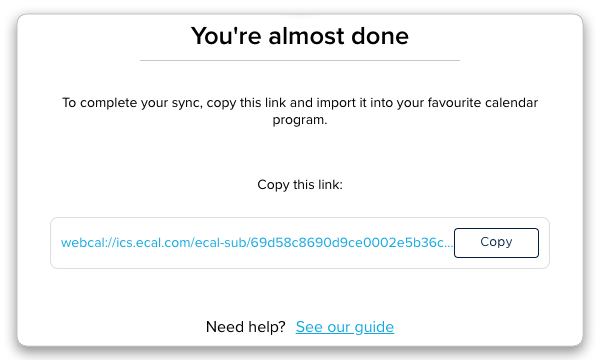
- Step 4: Open your Yahoo Calendar.
- Step 5: In the top ribbon, click Actions.
- Step 6: From the dropdown, select Follow Other Calendars.
- Step 7: Give the calendar a name (e.g MLB), paste in the URL in the iCal Address field, choose preferred display colours and toggle ‘Reminders’ on.
- Step 8: Click Save and events will populate your Yahoo calendar.
📱 Syncing on iPhone/Android (Yahoo App)
The Yahoo Mail app itself does not have a ‘Subscribe by URL’ feature. To see your ECAL events in the Yahoo app, you must add the subscription to your phone’s native calendar first:
-
For iPhone: Go to Settings > Calendar > Accounts > Add Account > Other > Add Subscribed Calendar. Paste the URL here.
-
For Android: Add the URL to your Google Calendar (Web) first.
Once added to your phone’s system, open the Yahoo Mail App, go to the Calendar tab, tap the Layers/Settings icon, and ensure your newly added calendar is checked/visible.
