

To unsubscribe and remove the events from your google calendar on your Android device, you must unsubscribe via your laptop or desktop. You cannot unsubscribe from your Android phone.
- Step 1: Open your Google Calendar
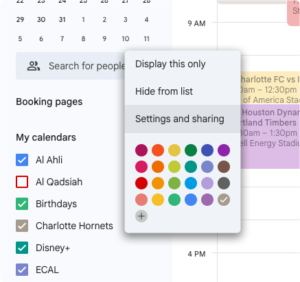
- Step 2: Under My Calendars, click the three dots of the calendar subscription you want removed
- Step 3: Select Settings & Sharing
- Step 4: Click Delete in the left hand menu or scroll to the bottom of the page and click the Delete button.
- Step 5: Confirm removal of subscription
_____________________________________________
- If you wish to revoke ECAL access forever, click here
- Seamlessly add or remove schedules and publishers to personalise your calendar experience from the Manage My ECAL portal.
