

To unsubscribe from a publisher, please complete the following steps (please note that the process may vary slightly, depending on the IOS version you are currently running. The below is for version 26).
There are two ways you can unsubscribe – via Settings or in the calendar itself.
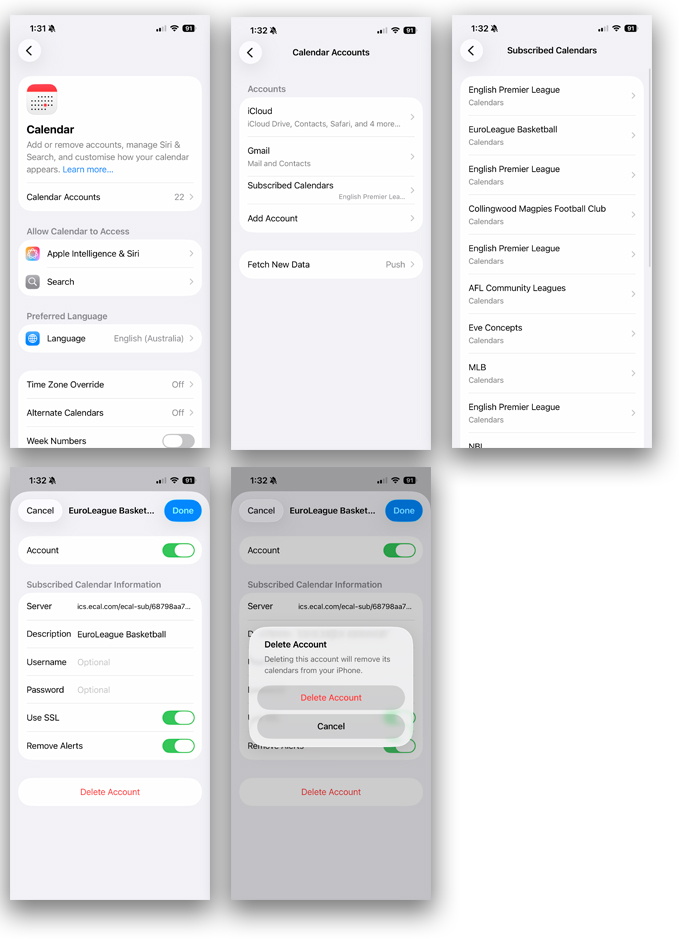
Remove via Settings App
- Step 1: Open the ‘Settings’ App on your device
- Step 2: Search for and select ‘Calendar’
- Step 3: Select ‘Calendar Accounts’
- Step 4: Select ‘Subscribed Calendars’
- Step 5: Choose the subscription you would like to remove and click ‘Delete Account’
- Step 6: Confirm Deletion
Remove via Calendar App
- Step 1: Open any event of the publisher you wish to remove and click ‘Unsubscribe from this Calendar’.
- Step 2: Confirm Unsubscribe.
or
- Step 1: Click the Calendar Icon
 (bottom right) to reveal a list of your subscribed calendars.
 - Step 2: Click the red info icon
 of the calendar you wish to remove.
 - Step 3: Click Unsubscribe.
- Step 4: Confirm Unsubscribe.
