

To unsubscribe from a publisher on your apple desktop calendar, please complete the following steps
- Step 1: Open your apple calendar
- Step 2: Click the ‘Calendars’ button
 in the top left corner to ensure your list of calendars are displayed (if not already)
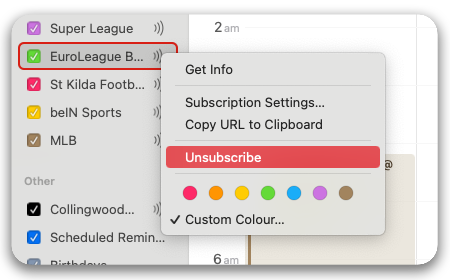
 - Step 3: Right-click on the calendar you wish to remove
- Step 4: Select ‘Unsubscribe’
- Step 5: Confirm Deletion
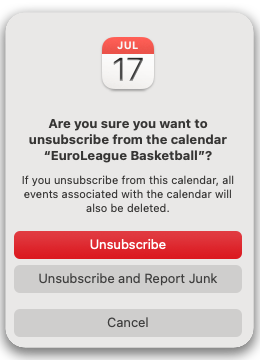
or alternatively, open any event of the publisher you wish to remove and click the Unsubscribe button.
If you wish to reactivate this calendar, you will need to resubscribe.
